 ®

Soca Insight On-Premise
Stop selling a busy location. Start selling the number.
Soca Insight On-Premise counts people and vehicles from the cameras already at your site. Detection runs on the Mac beside them, so the video never leaves the machine. Only the counts travel.
Get the highlights.
-
Cameras you already own
USB webcams and network CCTV both count. Add a camera by its USB source or its RTSP address, name it, and it is ready.

-
The video stays on site
Detection, counting and recording run on the Mac itself. What reaches the cloud is a count per hour and per session, never a frame of video.
0video frames sent to any server -
Max-per-Frame
The most objects visible together in a single frame. It is the density figure closest to reality, because nobody is counted twice in one picture.
Soca InsightSession 07:00 to 19:00People18,240Vehicles12,172Peak / frame46Video processed on site. Only the numbers leave.
-
A report you can attach
Export the sessions to CSV and attach the file to a proposal or an invoice. One row per session, one column per object type.
CSVopens in Excel or Numbers, with a total row
From a camera feed to a number you can sell.
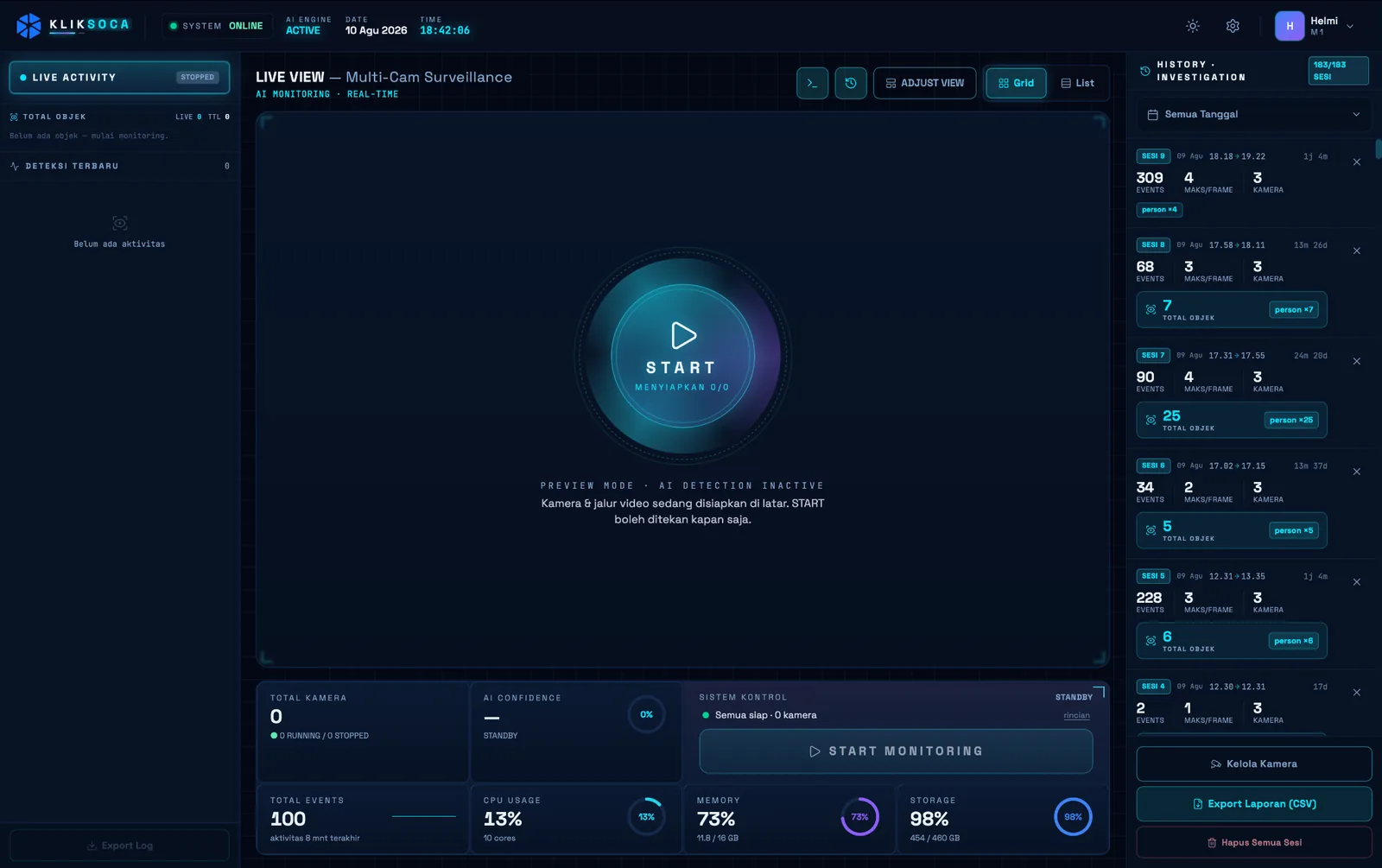
Everything happens on one screen: add the cameras, run a session, read the history, export the report.
Add the cameras you have
Pick a USB camera from the list of available sources or enter an RTSP address. Frame the part of the picture that should count, and give cameras that watch the same area the same zone, so one person is not counted twice.
- USB (UVC) webcams and RTSP network cameras
- Zones for cameras that share one area
- Zoom and pan to count only the area that matters
Count in monitoring sessions
Press Start Monitoring and the count begins, with the recording running beside it. Press Stop and the session is saved whole: its events, its objects by type, its peak and its recording.
- Live total and Max-per-Frame while it runs
- CPU, memory and storage on the same screen
- Recording kept on the machine as evidence
Soca InsightSession 07:00 to 19:00People18,240Vehicles12,172Peak / frame46Video processed on site. Only the numbers leave.
A history you can investigate
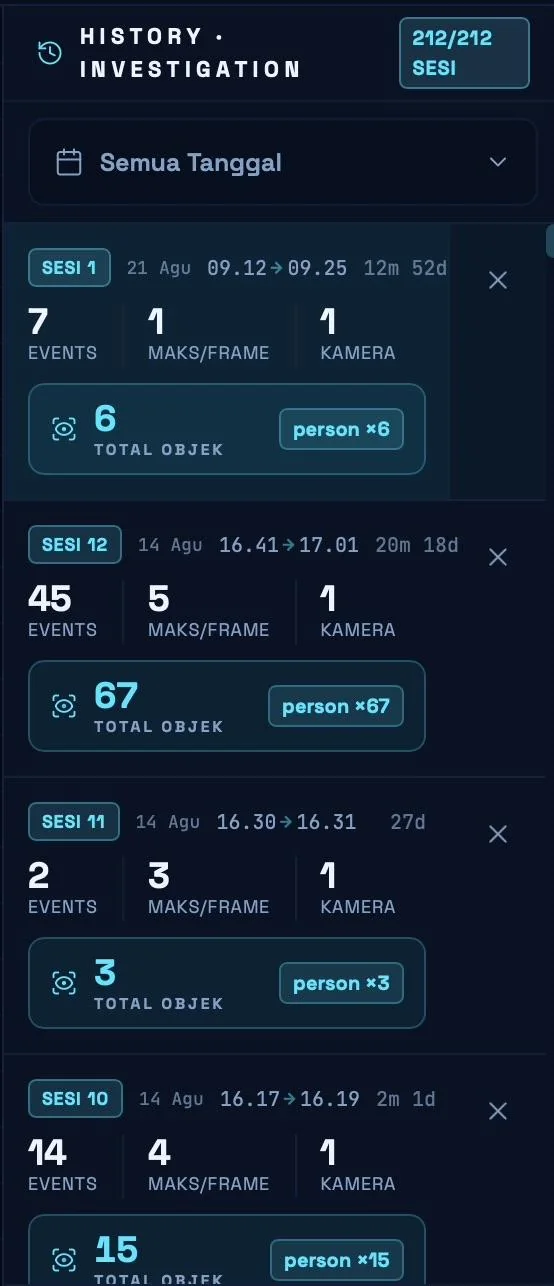
Every session becomes a card with its start and end time, events, Max-per-Frame, total objects and number of cameras. Filter by date, open a session and play its recording back.
- Date filter across all sessions
- Totals per object type, people or vehicles
Reports for proposals and invoices
Export Report writes a CSV that opens in Excel or Numbers: one row per session, one column per object type, a total row at the end. Set the date filter first to export a single period.
- Counts sync to Soca Insight Cloud whenever the machine is online
- A separate technical log for support
Campaign reportSilver · Bandung120/120plays verified- BDG · CicadasCCTV
- BDG · SudirmanCCTV
- BDG · PaskalCCTV
Measured where it airs, kept where it was seen.
An edge application by design: the camera, the count and the recording stay on one machine at the site.
Private by design, licensed to one machine.
The licence is activated once with a key from Kliktron and bound to the machine, not to an account. After activation the app works without internet: detection, counting and recording continue offline, and the counts sync once the line returns.
- No username or password: protect the macOS account with a password and lock the screen
- Device name and licence status shown in the app, for support
- Moving to a new machine is handled by the Kliktron team
One count, matched to every play.
On its own, Soca Insight On-Premise gives a location a number. Next to a Kliktron player, the count lines up with the play log, so a 15-second play can carry its own audience instead of a daily average.
The player keeps the time
Vertex Player and Klikplayer Mini write a timestamp for every play. Soca counts the audience over the same minutes.
Vertex PlayerThe cloud keeps the report
Counts arrive in Soca Insight Cloud on their own. Clients read their audience per device and per period without visiting the site.
Soca Insight CloudBoth sides see it
Advertisers see the play and the audience behind it. Media owners see what each point is worth.
Dual-Side ProofPriced per camera, cheaper as the network grows.
Billed per active camera, where one camera is one audience sensor. Pay monthly, or prepay a year at a lower rate.
-
SINGLE
1 to 2 cameras
$30.56per camera / month- One camera, one sensor
- Report export
-
Best seller
SITE
3 to 10 cameras
$23.61per camera / month- Save 23% per sensor
- Installation assistance
-
MULTI-SITE
11 to 40 cameras
$18.06per camera / month- Save 41% per sensor
- Account manager
-
ENTERPRISE
More than 40 cameras
$13.06per camera / month- Network pricing
- SLA follows the contract agreement
One-time fees and options
| Annual prepaid, SINGLE | $306per camera / year |
|---|---|
| Annual prepaid, SITE | $236per camera / year |
| Annual prepaid, MULTI-SITE | $181per camera / year |
Runs on macOS. Cameras and CCTV are supplied by the customer. Counting accuracy depends on the camera angle, the lighting and the camera quality.
Prices exclude 11% VAT. US dollar prices are converted from rupiah at Rp 18,000 = $1; invoices are issued in rupiah.
Tech specs.
Application
- Type
- macOS desktop application
- Detection
- AI object detection (YOLO model): people and vehicles
- Included
- AI engine, database and recorder built in, nothing else to install
- Roles
- Technician or administrator, operator
Computer
- Minimum
- Mac with Apple Silicon (M1), 8 GB RAM, 20 GB free
- Recommended
- Mac mini or Mac Studio (M2 or later), 16 to 32 GB RAM, 256 GB or more
- Operating system
- macOS 13 Ventura or later
Cameras
- Sources
- USB (UVC) webcam or RTSP network camera
- Resolution
- 720p minimum, 1080p recommended
- Several USB cameras
- Use a powered USB hub for two or more
- Supplied by
- The customer
Data
- Video
- Processed and stored on the machine only
- Cloud sync
- Counts per hour and per session to Soca Insight Cloud
- Export
- CSV report and technical log
- Internet
- Needed only for licence activation and report sync
Questions, answered.
No. Video and recordings stay on the machine. Only the counts, per hour and per session, are sent to Soca Insight Cloud.
No. Detection, counting and recording run fully offline. The internet is needed to activate the licence and to sync reports; counts wait in a queue and sync on their own when the line returns.
The same person can be counted again after being hidden and reappearing, or when two cameras watch one area. Read density from Max-per-Frame, and give cameras that face the same area the same zone.
USB (UVC) webcams and network cameras with an RTSP stream, 720p or better. The cameras are supplied by you, and accuracy depends on the angle, the lighting and the camera quality.
Yes. Turn off automatic sleep in the macOS energy settings so monitoring is never interrupted, and keep enough storage free for the recordings.
Per active camera, monthly or prepaid for a year. The price per camera falls as the number of cameras grows. Prices exclude 11% VAT.
Keep exploring, related pages.
Soca Insight CloudDetection jobs run on a network of partner GPUs and come back as audience analytics. Vertex PlayerThe CMS and player beside every videotron. It keeps airing when the internet drops.
 Klikplayer Mini SiteIndoor screens that switch themselves back on, with a play log you can hand to a tenant.Media OwnerRun, monitor and monetise your screens: offline-first airing, a fleet dashboard and retail sales of idle airtime.

Let’s make it Broadplay,
Anyone,
Anywhere,
Anytime.
See Soca Insight count a live camera feed in a 30-minute demo.