 ®
Kliktrack Mobile
No tracker, no SIM card. Just the driver’s phone.
Kliktrack Mobile reads the GPS already inside the driver’s phone and sends each position to Kliktrack Cloud. Press Start once, put the phone away, and the route keeps arriving.
Get the highlights.
-
Tracks from a pocket
After Start, tracking continues with the screen off, the phone locked, another app open, or the app swiped away.
1button to press before the shift -
Holds the route through tunnels
No signal? Positions are still read and held on the phone, then sent in full when the network returns. Nothing to press.
5,000points held on the phone while offline -
A status in one sentence
Sending, Searching for position, Holding data: the screen states the situation and the next action before any number.
5 sdefault send interval, from 1 second to 1 hour -
Route history on the phone
Past trips replay on the phone itself, with parking stops marked, and no network needed.
Route · Mōbitron Bandung 1Today24.5 km4 stops5 h 45 min on the road
From the driver’s pocket to the fleet map.
The phone reads, queues and sends. Kliktrack Cloud turns the points into live positions, trips, stops and routes your team can replay.
Signed in as the vehicle
The phone signs in with the plate number and the vehicle password issued in Kliktrack Cloud, once. One installation stands for one vehicle; a driver who changes vehicles signs out and in again with the new plate.
- Device token kept in the Android Keystore or the iOS Keychain; the password itself is never stored
- No Play Store and no Google services needed: Android APK, TestFlight for iOS
Live on the map in seconds
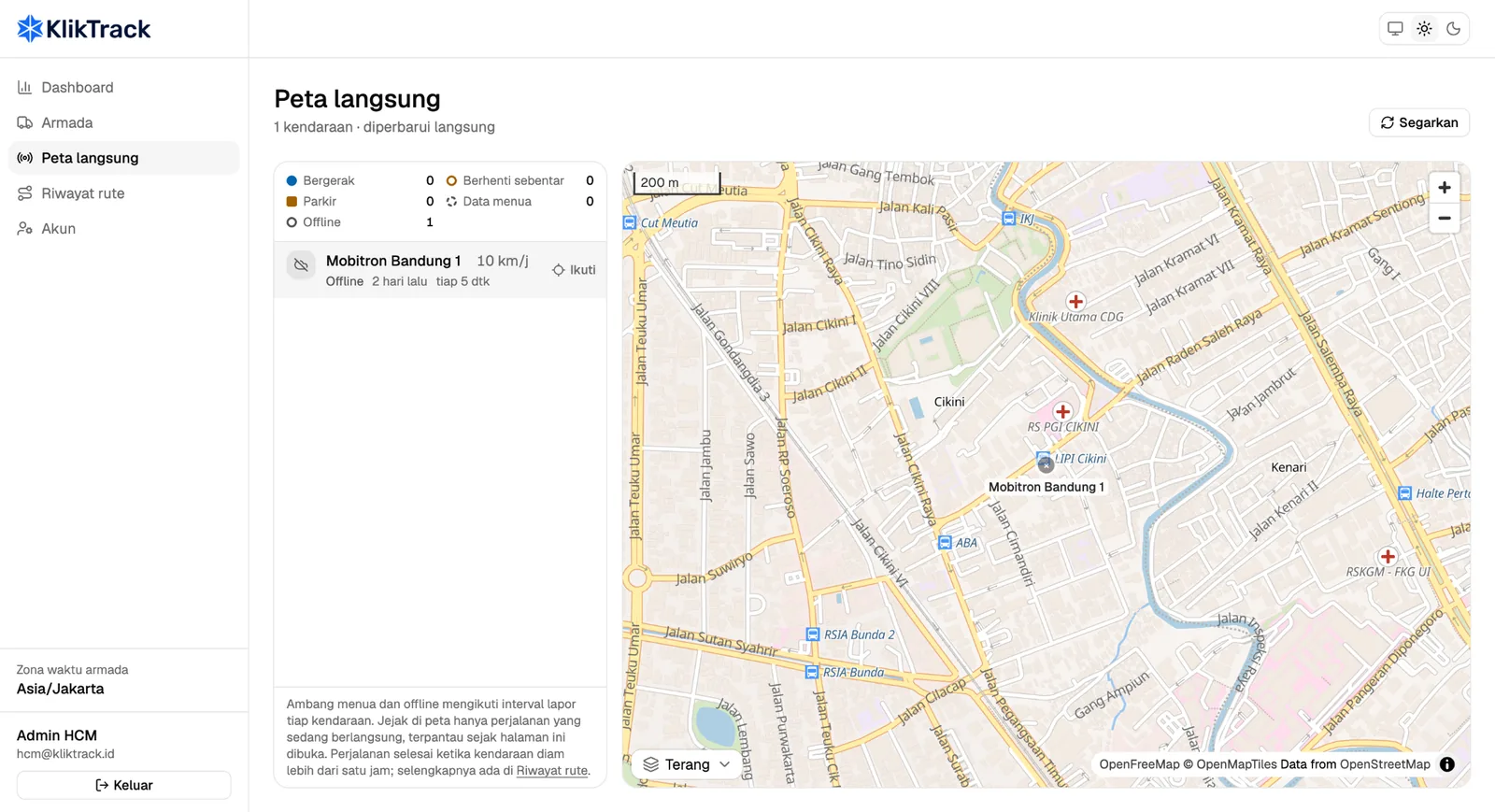
Positions arrive in Kliktrack Cloud at the interval you choose. The live map shows each vehicle as moving, stopped, stale or offline, judged against its own reporting rhythm.
- Follow one vehicle and the map stays with it
- Status by shape and text, never by colour alone
Trips, stops and dwell time
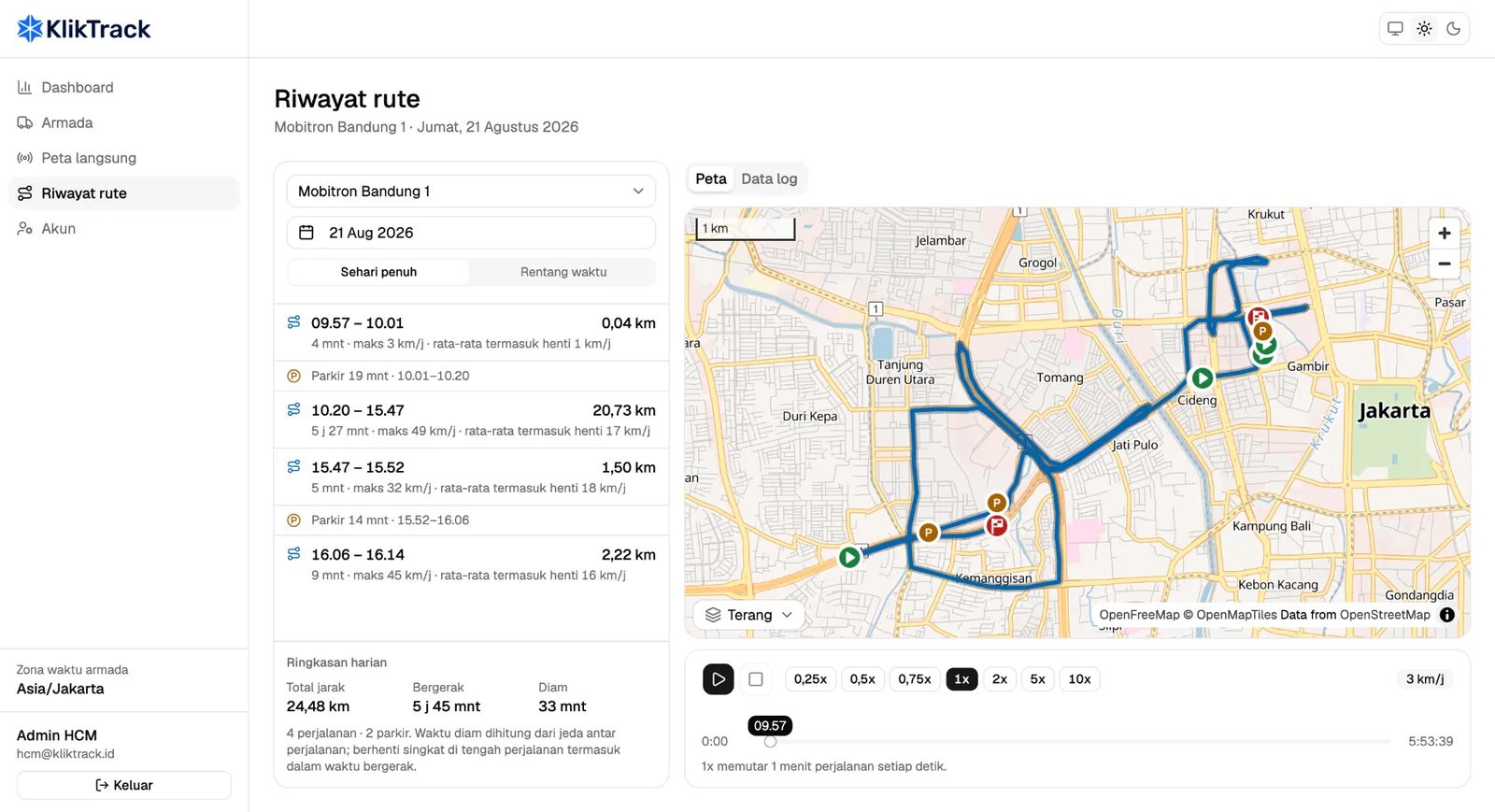
Kliktrack Cloud cuts the stream of points into trip sessions. Each trip lists its distance, duration and speed, and every stop with its arrival, departure and length.
- A stop longer than five minutes is marked P, the same on phone, desktop and cloud
- Daily summary per vehicle: trips, distance, moving time
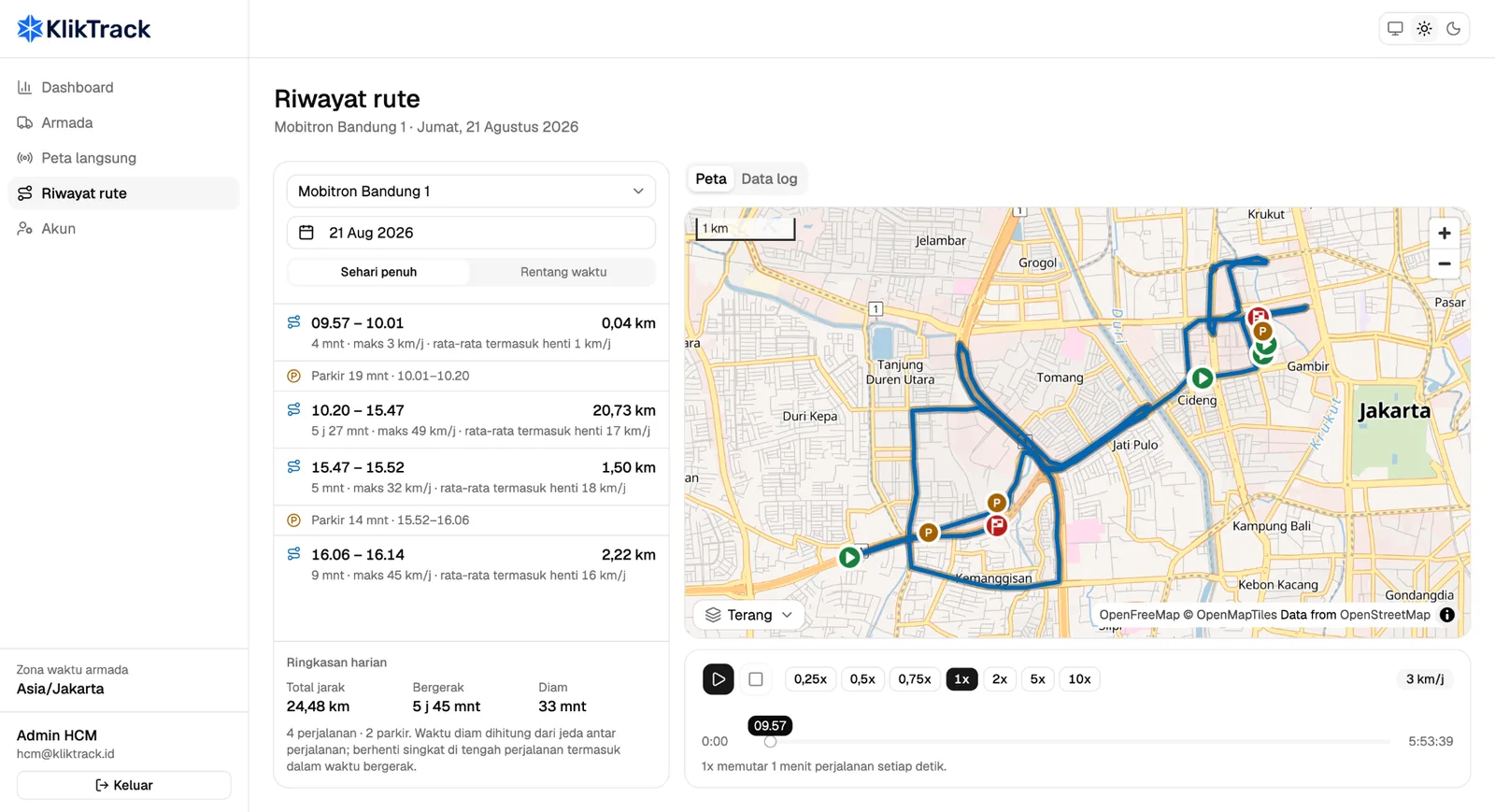
Replay, export, integrate
Pick a vehicle and a date, then replay the day on the map with a slider and speed control. The data log lists every GPS point and exports to a CSV file that opens correctly in Excel, and other systems can read routes through the integration API.
- CSV export of every point, not just the page on screen
- Integration API with a machine key per company
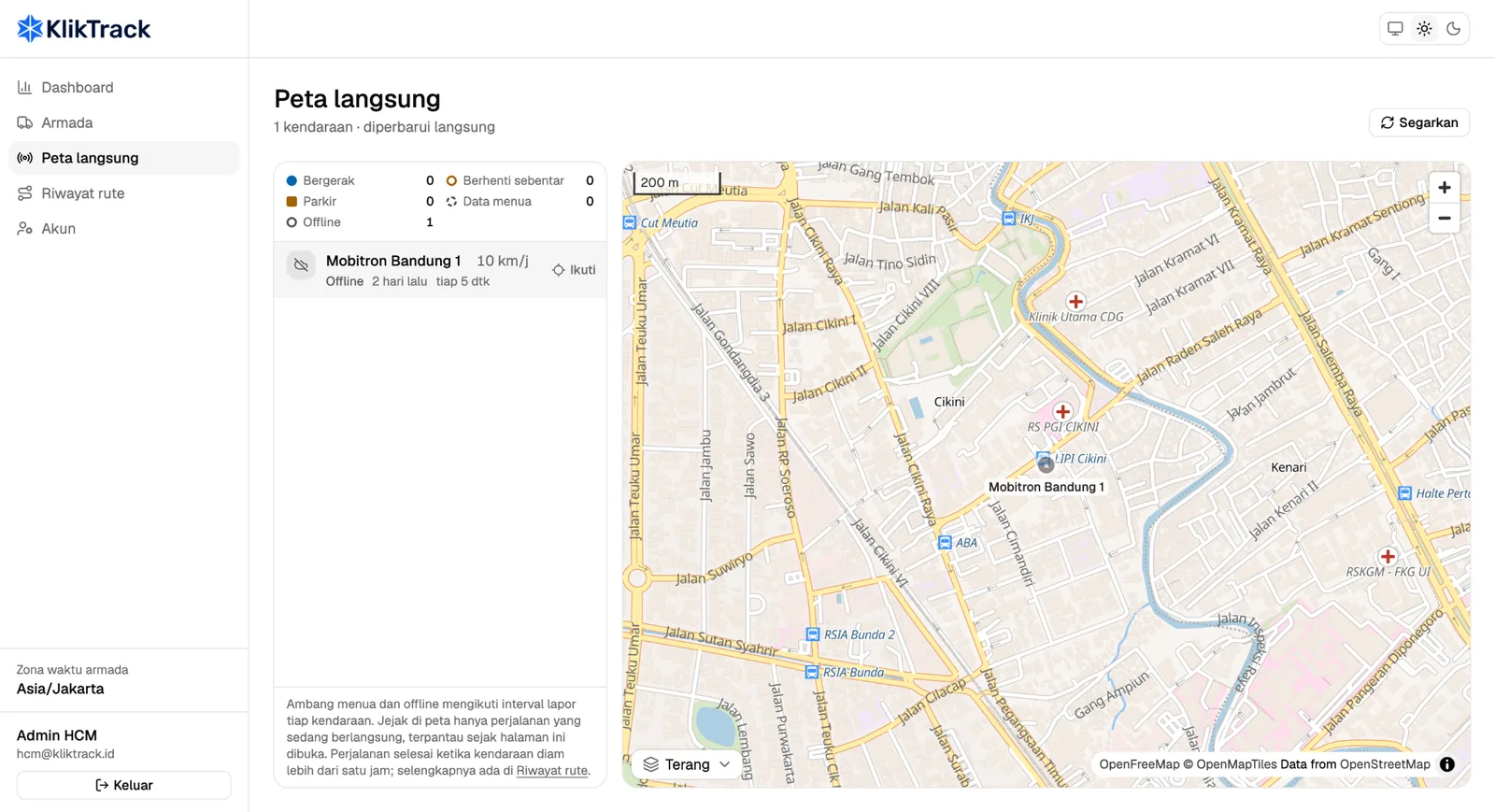
Three settings decide whether it tracks.
A phone that only tracks while the screen is on looks fine in the hand and goes silent in the pocket. Kliktrack Mobile asks for each permission when Start is first pressed, and names any gap on the status card instead of pretending to send.
- Location set to Allow all the time, so tracking continues in the background
- A battery-saver exception, so the system does not stop tracking hours later
- Notifications on, so a persistent line shows that tracking is running
- Xiaomi, Oppo, Vivo, Realme and other brands need one extra step, covered brand by brand in the setup guide
Route proof for every Mōbitron run.
Kliktron runs its own Mōbitron routes on this system. The same tools serve any fleet that needs to show where a vehicle went and how long it stopped.
Mōbitron campaigns
Live position, replayable routes, stops and dwell time that a brand can check for itself.
MōbitronShort activations
Rent per day, seven days minimum, when a campaign does not justify a permanent tracker.
Campaign planRental and daily fleets
Vehicles that change hands or routes track with the phone the driver already carries.
Mobile Out-of-HomeIncluded with Kliktrack Cloud, or on its own.
Kliktrack Cloud customers get the driver app at no extra cost. Without Cloud, pay per seat each month, or rent by the day for a campaign.
-
Best seller
BUNDLED
For Kliktrack Cloud customers
Included- Vehicle seat included
- Free updates
-
DESKTOP
Standalone desktop agent, macOS or Windows
$2.50per unit / month- A computer with a USB GPS receiver
- Local route history
-
MOBILE
Standalone mobile agent, Android or iOS
$1.94per seat / month- Activates on the driver’s own phone
- Route history on the phone
- Technical support
-
CAMPAIGN
Short-term rental, 7 days minimum
$0.25per unit / day- Made for activations
- Complete route proof
Mobile needs background location permission and a battery-saver exception on the phone. Bundled applies while the Kliktrack Cloud subscription is active.
Prices exclude 11% VAT. US dollar prices are converted from rupiah at Rp 18,000 = $1; invoices are issued in rupiah.
The dashboard behind the app, priced per vehicle.
Kliktrack Cloud is where the office reads the fleet: live map, trip sessions with stops and dwell time, route replay and the integration API.
-
SMALL
1 to 10 vehicles · 90-day retention
$8.06per vehicle / month- Full map and reports
- Driver app included
-
MEDIUM
11 to 50 vehicles · 180-day retention
$6.39per vehicle / month- Save 21% per unit
- Priority support
-
LARGE
51 to 200 vehicles · 1-year retention
$4.72per vehicle / month- API access
- Account manager
-
ENTERPRISE
More than 200 vehicles
$3.61per vehicle / month- Custom integration
- SLA follows the contract agreement
Vehicles are counted as units active in the month. Volume discounts apply to a 12-month commitment. The system tracks vehicles, not parcels or deliveries, and position accuracy depends on GNSS quality and the data network.
Prices exclude 11% VAT. US dollar prices are converted from rupiah at Rp 18,000 = $1; invoices are issued in rupiah.
Tech specs.
Phone
- Operating system
- Android 7.0+ · iOS 16.4+
- Processor
- ARM 32-bit or 64-bit
- Memory
- 2 GB RAM minimum, 4 GB recommended
- Storage
- 300 MB free minimum
- Position
- The phone’s built-in GNSS; no external receiver
Tracking
- Send interval
- 1 second to 1 hour, 5 seconds by default
- Offline queue
- Up to 5,000 points, resent automatically
- First position
- About 30 seconds from a cold start
- Parking stop
- Still for more than 5 minutes, marked P
Permissions
- Location
- Allow all the time
- Battery
- Exception from the battery saver
- Notifications
- Persistent tracking notification
- Power
- Car charger recommended for full shifts
Connection
- Destination
- Kliktrack Cloud over HTTPS
- Maps
- OpenFreeMap; tracking continues if maps fail to load
- Privacy
- No telemetry, nothing sent to third parties
- Distribution
- Android APK; iOS through TestFlight
Questions, answered.
No. Once Start is pressed, tracking continues with the screen off, in a pocket, behind other apps or after the app is swiped away. Only the Stop button, the server refusing the token, or the operating system can end it.
The status changes to Holding data. Positions are still read and kept on the phone, up to 5,000 points, and sent automatically when the network returns. Any point that is ever lost is shown, never hidden.
Without background location, positions are sent only while the app is on screen. Without the battery exception, many Android phones stop background tasks a few hours later without any sign. The app warns about both before you set off.
No. One vehicle has one installation. A new sign-in for the same plate retires the token of the previous device, which then stops sending.
The send interval sets how often GNSS is switched on. Every 5 minutes uses GNSS sixty times less often than every 5 seconds, at the cost of a less detailed route. For full shifts, keep a car charger connected.
No. It lets the driver check where the vehicle has been, offline. The official and permanent record lives in Kliktrack Cloud.
Keep exploring, related pages.
Kliktrack DesktopA computer in the vehicle reads a USB GPS receiver and sends the route to Kliktrack Cloud. MōbitronMoving videotrons and hyperlocal activation that take the campaign to the crowd, with every route tracked.Mobile Out-of-HomeMōbitron screens that travel to the crowd, with every route, stop and stop time tracked.
 TechnologyPlayers, cameras, tracking and the AOS core, explained for technical teams, integrators and investors.

Let’s make it Broadplay,
Anyone,
Anywhere,
Anytime.
See a driver’s phone appear on the fleet map in a 30-minute demo.