 ®
Photospace Automation
A photobooth with nothing to install. Your brand on every photo.
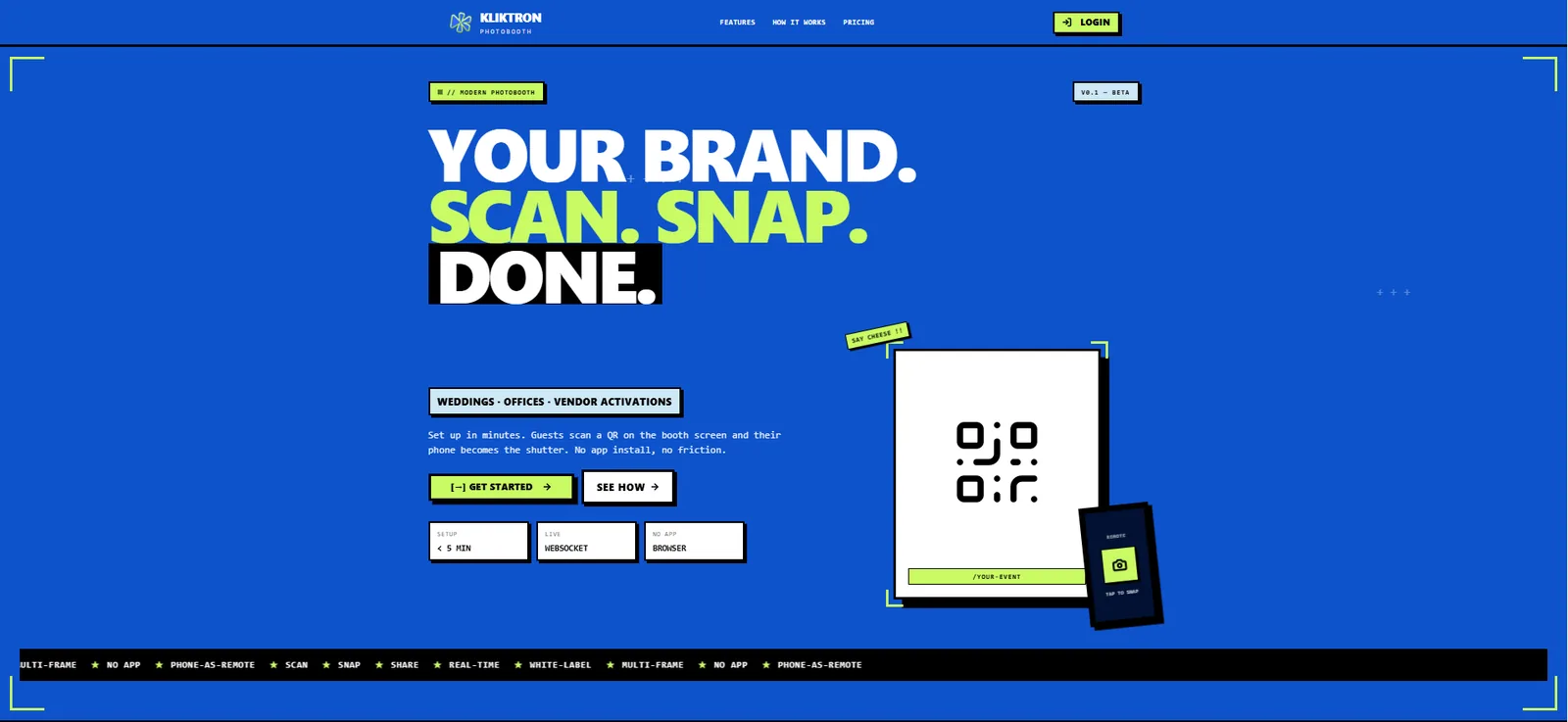
Open one address on the booth laptop and the booth is live. Guests scan a QR, their phone becomes the shutter, and the branded result reaches their WhatsApp before they leave.
Get the highlights.
-
The guest’s phone is the shutter
The guest scans the QR on the booth screen and shoots from their own phone, with a live preview. Nobody has to stand behind the laptop.
YOUR BRAND
SCAN. SNAP. DONE.Sent to WhatsApp -
Nothing to install, anywhere
No app on the booth laptop, no app on the guest’s phone. The booth, the remote and the photo page all run in the browser.
0apps to install, on the laptop or the phone -
Your brand, never ours
Colours, logo, background and every line of text are set per event. Guests see the organiser’s brand, not the platform’s.
-
One account, many events
Each event is a room with its own address, layouts, gallery and door prize. Run several at once without a photo landing in the wrong place.
2booth modes at one address: QR and touch screen
Create a room, set the brand, open the booth.
The whole setup is one straight line: create a room, add a layout, set the branding, open the booth address on the laptop. The first guest can shoot right after.
One room for every event
A room holds everything for one event: the public booth address, the photo layouts, the branding, the gallery and the door prize. Rooms run side by side, and photos never mix between them.
- Booth, photo wall and door prize each have their own address
- Countdown and camera settings apply across the whole account
Two modes at one address
In QR mode the guest’s phone becomes a remote shutter, and their name and WhatsApp number are collected on the way. In touch-screen mode guests tap the booth screen, choose a layout and filter, then scan a QR on the result to download. Switch modes any time; the address stays the same.
- QR mode: no operator at the laptop, guest data for the door prize
- Touch-screen mode: a faster queue, no phone needed to shoot
YOUR BRAND
SCAN. SNAP. DONE.Sent to WhatsAppLayouts that carry the brand
Start from six presets, from a single shot to strips and a 2×2 grid, then make them yours. A transparent overlay carries the frame, logo and event name over every photo.
- Default canvas 1200 × 1800 px, a 4R print at 300 DPI
- Filters, mirror, frame style and a text watermark per layout
Delivered to WhatsApp, booth ready for the next guest
In QR mode the finished photo appears on the guest’s phone and goes to their WhatsApp, with an animated version for multi-frame layouts. The booth returns to the QR for the next guest while the first one is still looking at their photo.
- One QR serves one phone, so photos never swap between guests
- WhatsApp delivery follows gateway availability
Gallery, photo wall and door prize on site
Every photo lands in the room gallery, ready to download or print. A second screen can play the photo wall, and the door prize draws winners from the faces of guests who took a photo.
- Photo wall refreshes on its own and doubles as the booth’s idle screen
- Door prize: one guest, one slot, in QR mode

Sized for the event day.
A web service for vendors who run many booths, with the limits written down before the event starts.
How a guest takes the photo home.
QR mode, from the first scan to the photo on the phone. The guest never installs anything.
- 01
Scan the QR
The booth screen shows a QR with a countdown. The guest scans it with the phone camera.
- 02
Say who you are
Name and WhatsApp number, typed once on the phone.
- 03
Pick a layout
When the room has more than one layout, the choice appears on the booth screen at once.
- 04
Press the shutter
Countdown, flash, saved. One press for each frame, so there is time to change the pose.
- 05
Take it home
The branded photo appears on the phone, ready to download and on its way to WhatsApp.
Built for the people who run the booth.
Photobooth vendors, event agencies, brand activations and event sponsors. Instead of paying for a licence again at every event, one subscription covers every room the account runs.
- Vendors: one account for every client event
- Brands: guest names and WhatsApp numbers collected in QR mode
- Activations: pairs with a Mōbibooth or a Photospace LED Screen
Start free, then pay per account, not per event.
Billed monthly per account, or annually in advance. The room limit counts active rooms; storage counts the total size of all finished photos.
-
TRIAL
7 days · 1 room
Free- Automatic for a new account
- Every feature to try
- No credit card, ends on its own
-
Best seller
STARTER
3 rooms · 10 GB
$19.39per tenant / month- Full white-label per event
- Results to WhatsApp
- Annual prepaid available
-
PRO
10 rooms · 50 GB
$49.94per tenant / month- Up to 10 events at the same time
- Photo wall and door prize
- Annual prepaid available
-
BUSINESS
Unlimited rooms · 250 GB
$127per tenant / month- Unlimited events
- Priority support
- Annual prepaid available
One-time fees and options
| Annual prepaid, STARTER | $194per tenant / year |
|---|---|
| Annual prepaid, PRO | $499per tenant / year |
| Annual prepaid, BUSINESS | $1,272per tenant / year |
The booth laptop, camera and printer are supplied by the customer. WhatsApp delivery follows gateway availability. After a subscription ends there is a 7-day grace period: older photos stay visible, new sessions pause until renewal.
Prices exclude 11% VAT. US dollar prices are converted from rupiah at Rp 18,000 = $1; invoices are issued in rupiah.
Tech specs.
Application
- Type
- Web SaaS, one account runs many events
- Install
- None, on the booth laptop or the guest’s phone
- Browser
- Google Chrome · Microsoft Edge
- Sign-in
- One-time code on WhatsApp, no passwords
Booth
- Modes
- QR (phone as remote) · Touch screen
- Camera
- Laptop webcam, USB webcam, or a mirrorless or DSLR camera through an HDMI capture card
- Supplied by the customer
- Booth laptop, camera and printer
- Connection
- Internet required at the booth; bring a backup line
Photos
- Default canvas
- 1200 × 1800 px portrait or 1800 × 1200 px landscape, 4R at 300 DPI
- Files
- JPG, plus an animated version for multi-frame layouts
- To the guest
- WhatsApp in QR mode, a download QR in touch-screen mode
Account
- Roles
- Account owner · Operator on site
- Payment
- QRIS, virtual account, e-wallet or retail outlet
- Grace period
- 7 days after a subscription ends
Questions, answered.
No. Guests scan the QR with the phone’s own camera and everything runs in the phone’s browser. WhatsApp is only needed to receive the photo there; without it the photo can still be downloaded.
No. Sessions are created and photos are composed on the server, and the QR points to the server. Bring a backup connection to venues where the signal is weak.
QR mode suits booths where guests pose away from the laptop, and it collects names and WhatsApp numbers for delivery and the door prize. Touch-screen mode is quicker per guest and needs no phone to shoot; guests download the photo by scanning a QR on the result screen.
No. Door prize entrants are guests who gave their name and WhatsApp number, and touch-screen mode does not ask for them.
A 7-day grace period starts. Older photos stay visible, but the booth stops taking new guests until you renew. Renew before the event day, not on it.
A laptop with Chrome or Edge, a camera, a power connection and internet, plus a photo printer if you print on site. The equipment is supplied by the customer.
Keep exploring, related pages.
Photospace LED ScreenThe Photospace activation on an LED screen. Guest photos appear in the brand frame on the big screen, then reach WhatsApp.Game Interactive LED ScreenCrowd games on an LED screen. Players join from their phone, scores run live on the big screen, the brand runs the prizes. MōbitronMoving videotrons and hyperlocal activation that take the campaign to the crowd, with every route tracked.
 Brand & AgencyPlan across cities, buy by the play, and report with verified plays and a counted audience.
Let’s make it Broadplay,
Anyone,
Anywhere,
Anytime.
See a guest’s photo travel from the booth to WhatsApp in a live demo.